Free on one device — set up in seconds
Pageback: the Private Reading OS
for Your Own Books
Bring your EPUBs, PDFs, comics, Kindle highlights and Calibre library. Pageback turns the mess into a smart, searchable, AI-assisted reading library.
PageBack reads EPUBs, PDFs, comics, MOBI, and AZW3 files — then organises them automatically with AI. Built-in text-to-speech, an AI reading assistant, vocabulary flashcards, highlights export, and reading insights make it the most complete e-reader for serious readers.
Unlike Kindle or Apple Books, your files are yours. No locked store, no DRM enforcement, no subscription to read books you already paid for.
Trusted by readers in 40+ countries. Works offline as a Progressive Web App.
Set up in seconds, organised for years
No configuration wizards. No manual tagging. Just drop your files in.
- 01
Import your files
Drag in an EPUB, PDF, comic archive, or a whole folder at once. Connect OPDS catalogs like Calibre-Web, or import your Goodreads library. PageBack accepts files directly from your device — no conversion needed.
- 02
AI organises everything
PageBack identifies what each file is — novel, academic paper, manual, comic, magazine — and tags it with genre, themes, and series information automatically. Missing covers, authors, and metadata are filled in by AI.
- 03
Read, listen, annotate, discover
A premium reading experience for every format. Highlight and take notes, listen with text-to-speech, ask the AI about your book, build vocabulary flashcards, and track your reading goals — all in one app.
One reader for every format you own
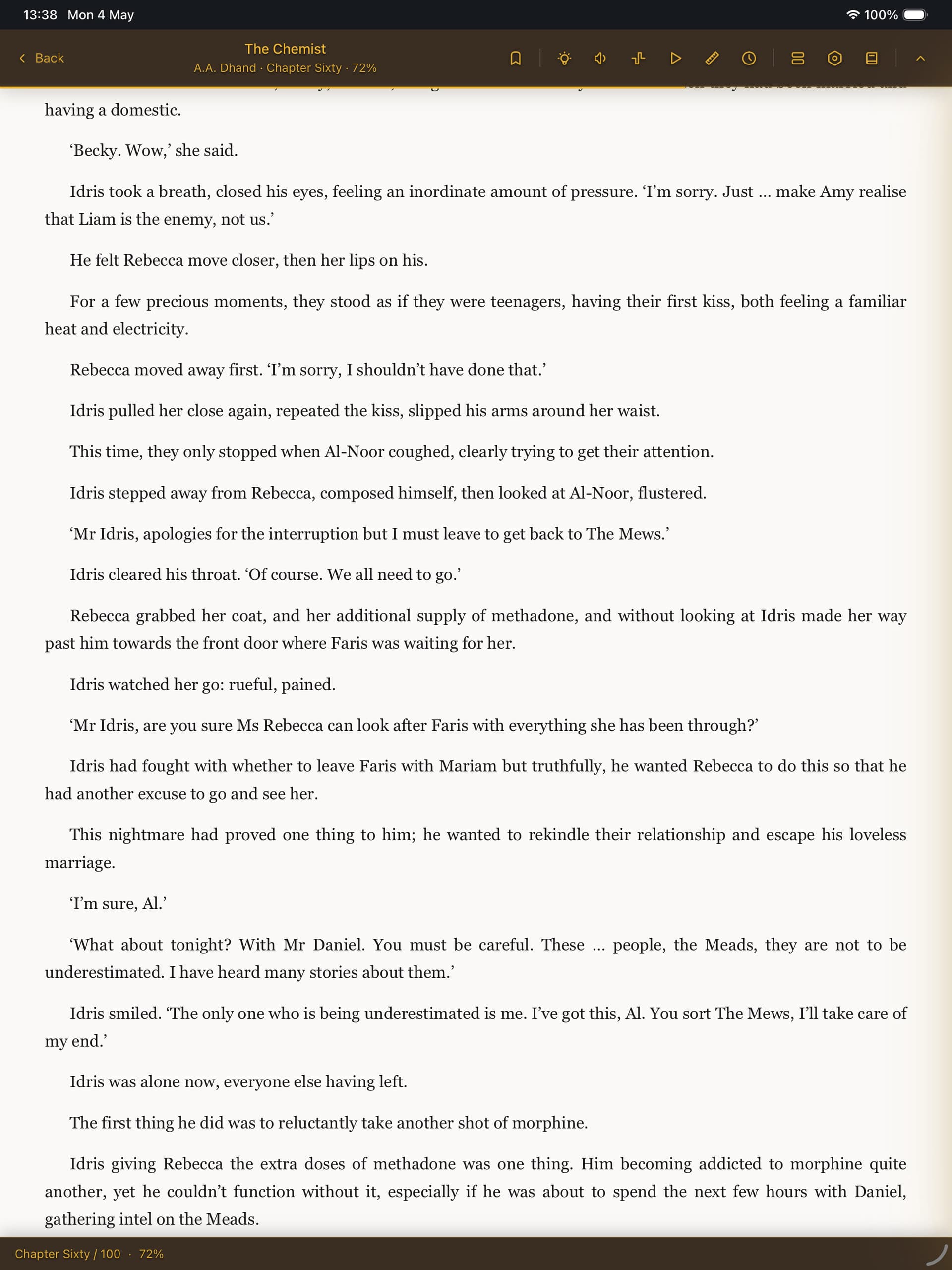
EPUB, PDF, MOBI, AZW3, CBZ, and CBR — all in a single app with a distraction-free reading experience.
A clean, customisable reader
Reflowable text for ebooks, paginated scroll for PDFs, pan-and-zoom with double-page spreads for comics. Six named reading modes — Focus, Cosy, Study, Skim, Audiobook, Night Owl — apply a complete set of preferences in one tap.
Choose your font, theme (dark, light, sepia, paper), line height, and page width. Enable page curl animations, auto-scroll, or a reading ruler. Right-to-left manga mode built in.
AI-powered library organisation
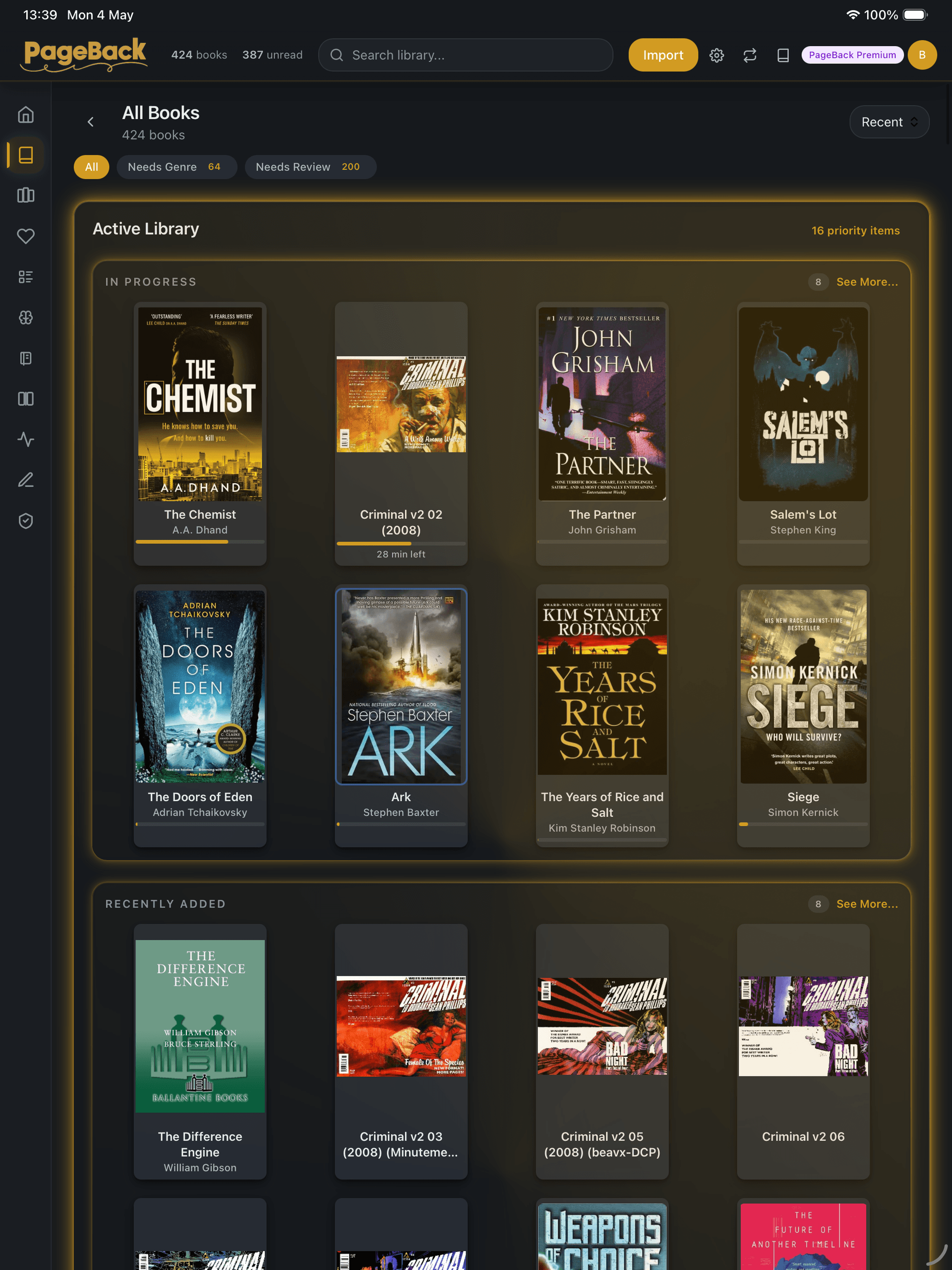
Import and PageBack takes over. Each document is classified by domain, genre, themes, and series — then enriched with missing metadata. Smart Collections let you build rule-based filters with AND/OR logic, or use pre-built ones like Fresh Unread and Quick Wins.
Library Health Centre scans for issues (duplicates, missing covers, classification gaps) and suggests one-click fixes.
Find what to read next
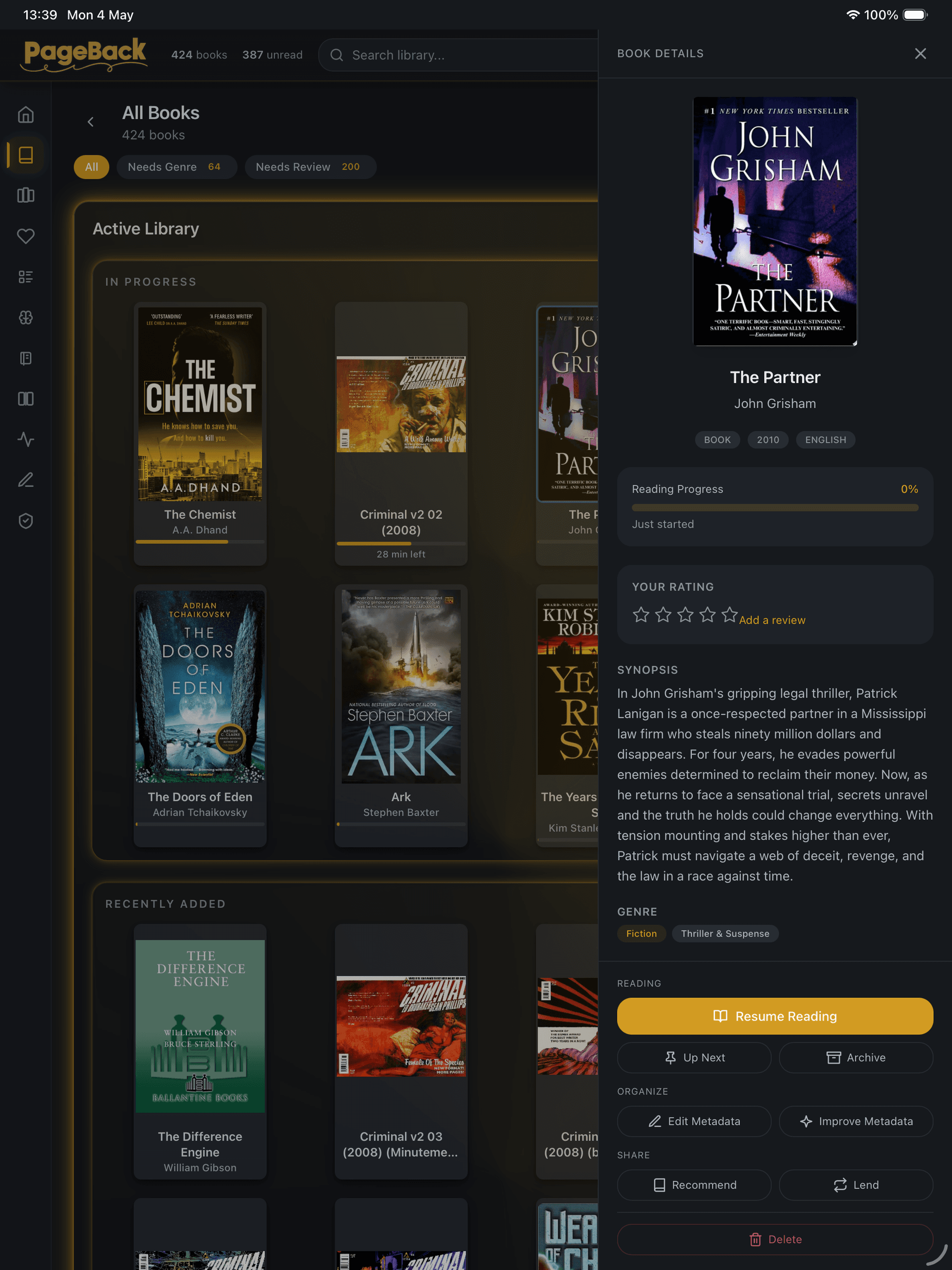
Deep book details with genre, themes, series position, and reading progress. Mood-based discovery asks 'What are you in the mood for?' and scores your library to match. Get recommendations from people you trust — no algorithms, no public feed.
Reading Radar surfaces patterns across your collection. Suggested section learns your taste over time.
Your AI reading companion
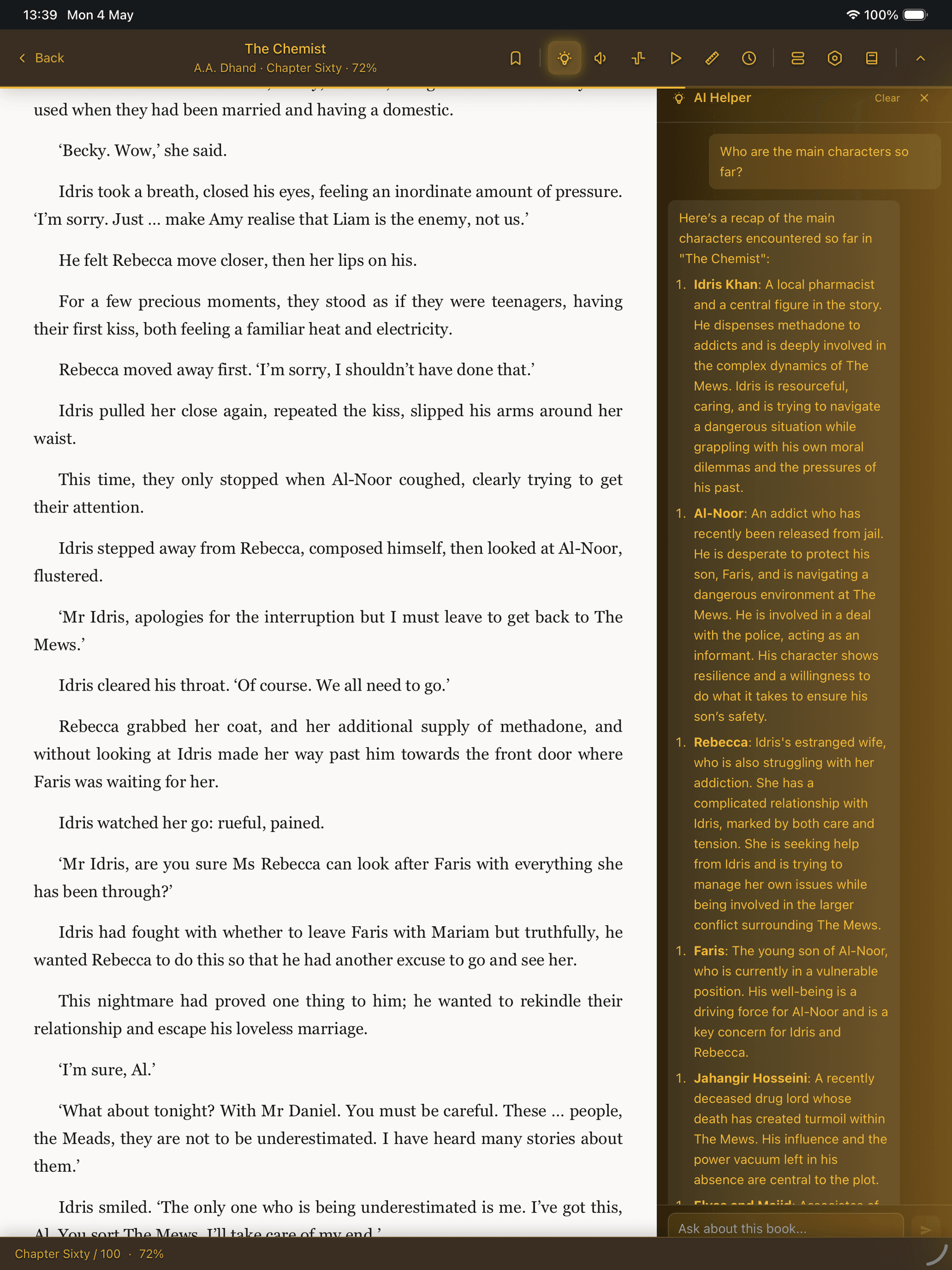
Like having a well-read friend on call. Ask questions, get recaps, track characters — without spoilers.
AI Book Helper
A conversational assistant that knows where you are in the book. Explain passages, summarise chapters, recap characters, discuss themes, or ask anything — spoiler-free.
Ghostreader (inline AI)
Select any text and instantly simplify, rephrase, define, translate to any language, or get an ELI5 explanation. Context-aware and streamed in real time.
Concept and character tracker
A spoiler-safe tracker that extracts characters, places, and concepts from chapters you've read. See each entity's role, status, and importance — never looking ahead.
Story Recap
Returning after a break? 'Where Was I?' recaps your current book. Starting a sequel? 'Story So Far' recaps the previous books without spoiling the new one.
AI Key Ideas
Submit a book's highlights to extract key themes, connections between ideas, actionable takeaways, and a synthesis across all your annotations.
Smart enrichment
Every import is automatically classified by genre, themes, tropes, and series. AI fills in missing metadata — covers, authors, series position — so you never have to.
Listen while you read — or instead of reading
Three text-to-speech engines, ambient soundscapes, and reading modes that set the perfect atmosphere.
Text-to-speech with karaoke highlighting
Three TTS engines: browser-native voices, Kokoro on-device AI (neural quality, no internet needed), and server-side generation. The current sentence highlights as it's spoken.
Ambient reading sounds
Rain, fireplace, cafe, or create your own custom audio mix. Built-in soundscapes powered by Web Audio that pause automatically when you stop reading.
Named reading modes
Switch between Focus, Cosy, Study, Skim, Audiobook, and Night Owl with one tap. Each mode applies a coordinated bundle of theme, font, audio, and layout settings.
Capture, review, and export your reading
Highlights, vocabulary flashcards, freehand ink, and one-click export to your second brain.
Multi-colour highlights and notes
Select text and highlight in any colour. Add notes. Browse everything in the Highlights Hub with Recent, All, Books, Review, and Key Ideas views.
Export to Obsidian, Notion, and Readwise
Export highlights as Markdown, Obsidian-formatted MD, Notion MD, Readwise CSV, plain text, or JSON. Your annotations work wherever you think.
Vocabulary builder with spaced repetition
Tap any word for a definition. Save it to your vocabulary list. Review with built-in flashcards powered by the SM-2 spaced repetition algorithm — learn words permanently.
Quote Share Cards
Generate beautiful branded image cards from any highlight. Two visual themes, book cover included. Share via Web Share API, copy to clipboard, or download as PNG.
Freehand ink drawing
Draw directly on reader pages with six colours and three stroke widths. Circle passages, annotate diagrams, sketch margin notes. Save as annotations or export as PNG.
Bookmarks and position history
Drop named bookmarks anywhere. Position history keeps an automatic breadcrumb trail so you can retrace your steps through any book.
Track your reading, hit your goals
Reading Radar, series tracking, goals, journal, and Year in Review — see your reading life clearly.
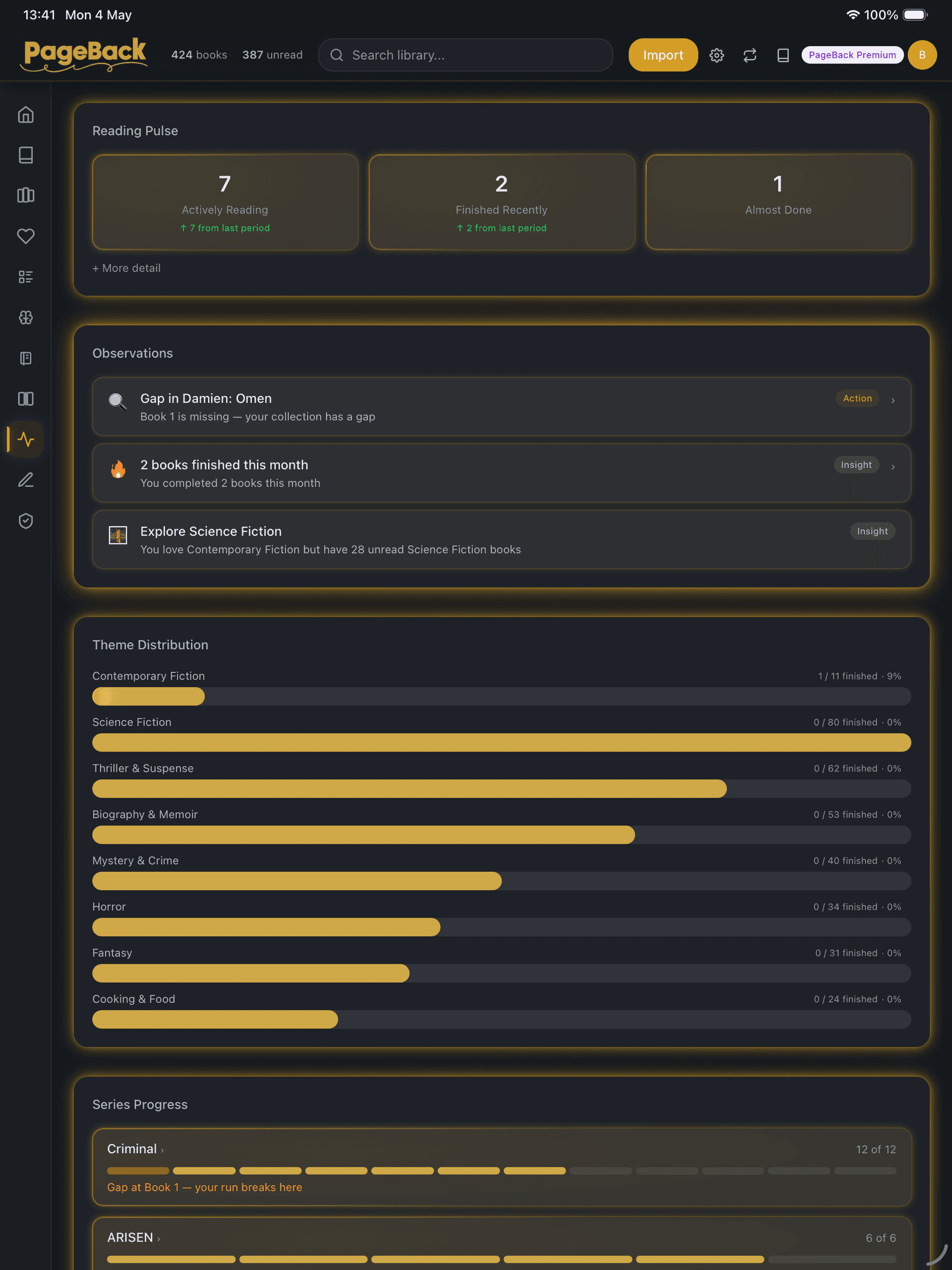
Reading Radar
A personal analytics dashboard: heatmap calendar, theme distribution, length profile, diversity badge, reading velocity, AI observations, and series progress — all in one view.
Series tracker with AI completion
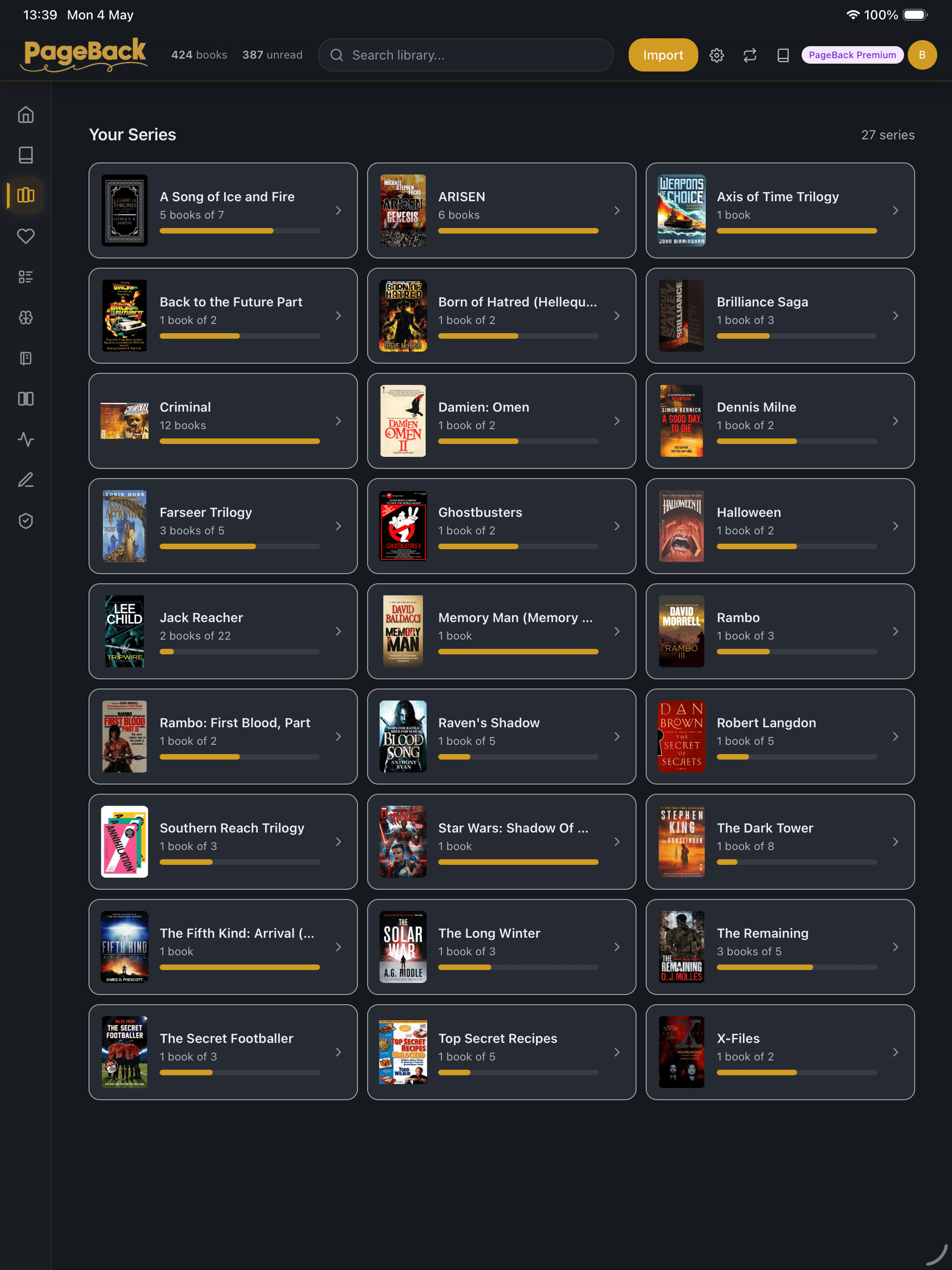
PageBack detects series automatically. See what comes next, find missing books as 'ghost entries' with covers, and add them to your wishlist. Never lose your place in a series.
Reading goals and focus timer
Set annual book targets, track milestones, and celebrate when you hit them. Start a focus timer for timed reading sessions with a summary at the end.
Automatic reading journal
Journal entries are generated automatically from your reading sessions. Each captures the book, time spent, pages covered, and highlights made. Export in your preferred format.
Year in Review
An annual reading statistics summary that recaps your year — books finished, time spent, genres explored, and standout moments.
Reading speed and time estimates
PageBack profiles your reading speed by format and shows estimated time remaining for each book. Books auto-transition through unread, reading, stale, and completed states.
Read together — lend, recommend, and rate
Share books with friends without giving up your copy. No public feeds, no algorithms — just people you trust.
Lend ebooks to friends
Lend any book to a connection with a set expiration. They read it in PageBack with progress synced back to you. Revoke any time, or approve extension requests.
Personal recommendations
Send book recommendations to connections with a personal note. See what friends suggest — no algorithm deciding what you see.
Ratings and friend reviews
Rate books 1–5 stars with an optional review. See how your connections rated the same title when deciding what to read next.
Plus everything you'd expect, done well
Works offline (PWA)
Install PageBack to your home screen like a native app. All documents stored locally — read without internet. Changes sync when you reconnect.
Cloud sync across devices
Documents, covers, reading position, highlights, and notes sync across every device. A sync status indicator shows current state.
Smart Collections and automation
Build rule-based collections with 11 filter operators and AND/OR logic. Define automation rules for bulk tagging, reclassification, or any repetitive task.
Library Health Centre
A diagnostic scanner that scores your library 0–100, finds duplicates, missing covers, and classification gaps, then suggests one-click fixes.
Keyboard shortcuts
Arrow keys and Page Up/Down for navigation. B for bookmarks. ? for AI Helper. Escape to close. Full keyboard accessibility.
Import from anywhere
Drag and drop, file picker, OPDS catalogs (Calibre-Web), Goodreads CSV import with duplicate reconciliation, Kindle highlights import, or restore from backup.
Perfect for how you read
Series readers
Automatic series detection, AI-powered "Story So Far" recaps, character tracker, ghost book entries for missing volumes, and catch-up prompts when you return after a break.
Students and researchers
Text-to-speech for accessibility, vocabulary flashcards with spaced repetition, highlights export to Obsidian and Notion, AI passage explanations, and freehand ink annotations.
Manga and comic fans
Right-to-left reading direction, double-page spread, pinch-to-zoom with magnifier, momentum-based page swiping, and optimised comic image rendering. CBZ and CBR fully supported.
Casual readers who want more
Mood-based discovery, ambient sounds, reading goals, focus timer, Year in Review, and six named reading modes that set the perfect atmosphere with one tap.
Simple, honest pricing
Free forever for local reading. Pay only when you want cloud sync.
Free
Everything you need to start reading
- ✓All file formats (EPUB, PDF, MOBI, AZW3, CBZ)
- ✓AI metadata enrichment
- ✓Highlights, notes & bookmarks
- ✓Text-to-speech (browser + on-device AI)
- ✓Vocabulary flashcards with spaced repetition
- ✓Smart auto-classification
- ✓Reading statistics & goals
- ✓Series tracking
- ✓Local storage — your device only
- ✓One device
One device included free.
Plus
Sync your library across devices
- ✓Everything in Free
- ✓Cloud sync across all your devices
- ✓5 GB cloud storage
- ✓Reading position sync
- ✓Highlights & notes sync
- ✓Book lending to connections
Account required for sync.
Premium
For large collections and heavy readers
- ✓Everything in Plus
- ✓25 GB cloud storage
- ✓AI Book Helper & Ghostreader
- ✓Story Recap & Concept Tracker
- ✓Batch AI enrichment for bulk imports
- ✓Advanced Reading Radar & insights
- ✓Priority support
- ✓Early access to new features
Account required for sync.
Prices shown per month. Cancel any time.
Common questions
Your library is waiting.
Import your first book in under a minute. Sign up, drop your files in, and start reading — no configuration needed.
Free on one device. Cloud sync from £3.99/month. Cancel any time.
Contact us
Questions, feedback, or just want to say hello? Drop us a line.
paul@pageback.app